Remaining Claude, ChatGPT & Gemini usage, right in Chrome
Leeway is a free, open-source Chrome extension that shows how much of your AI usage limits is left — the 5-hour and weekly limits — in a popup, the toolbar badge and an always-on-top overlay.
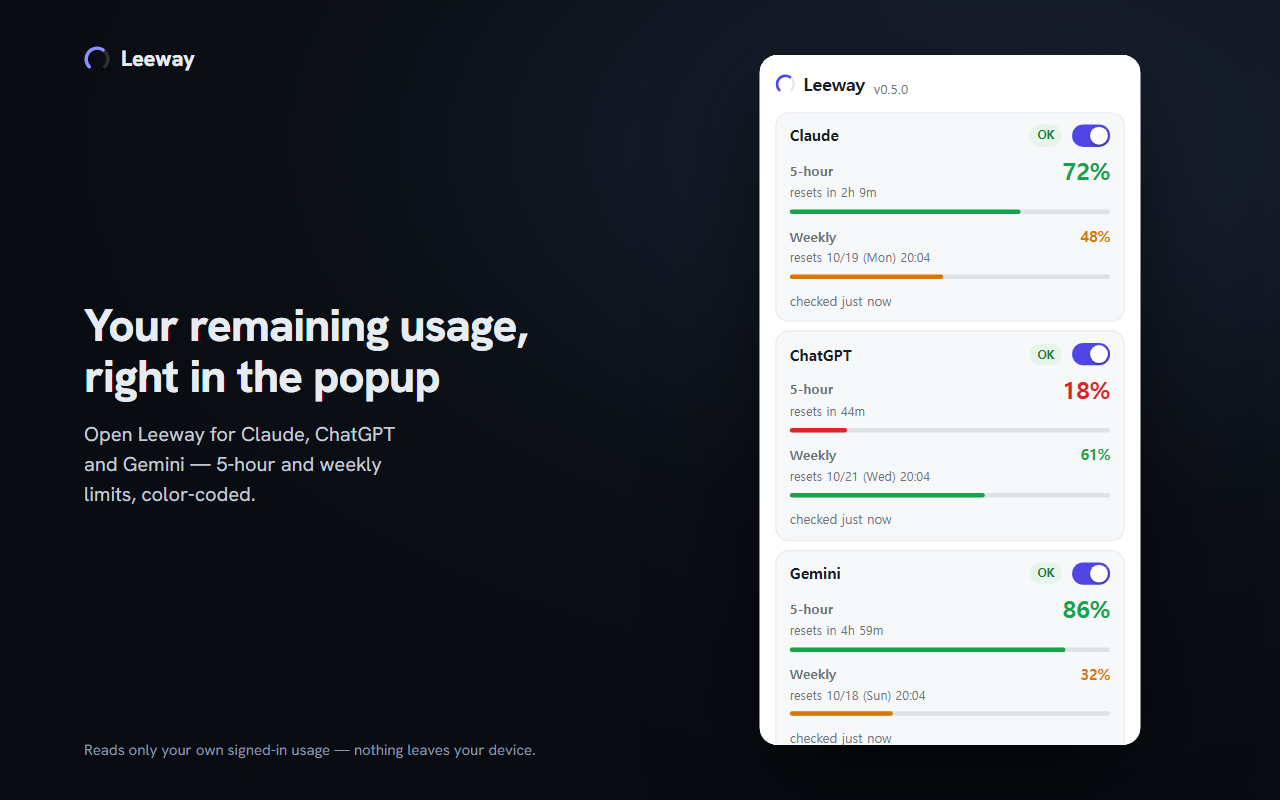
What it shows
- Remaining percentage and reset time of each limit — the same numbers your signed-in usage pages show, not a token-count estimate. A value that could not be read is shown as
?, never as 0%. - Toolbar badge with the lowest remaining value among the services you turned on: green from 50, orange from 20 to 49, red below 20, grey when the value is old.
- Always-on-top overlay through Chrome's Document Picture-in-Picture (Chrome 116+). Click it to collapse it to one line.
- Plan names such as Max 5x or Plus, when the service reports them.
- Every Claude organization of your sign-in (for example a personal plan and a Team workspace), each with its own remaining usage.
- Values refresh every 2 minutes; Refresh in the popup reads them right away.
- In English, Korean, Spanish, Japanese and Chinese (Simplified and Traditional).
Supported services
| Service | What Leeway reads |
|---|---|
| Claude | The 5-hour and weekly limits from the usage endpoint claude.ai's own usage page uses. No tab needs to be open. |
| ChatGPT | What Settings > Usage shows: the plan limits shared by Codex, Work, workspace agents and ChatGPT for Excel (5-hour, weekly, or 30-day, depending on the account). Ordinary chat conversations are not counted there. No tab needs to be open. |
| Gemini | The current-usage and weekly cards on an open gemini.google.com/usage tab. Gemini has no usage API, so that page needs to be open; the popup's Gemini usage button opens it, or switches to it if it is already open, and reads it once it has loaded. |
These are not public, stable APIs and may change without notice.
Private by design
- Uses the sessions you are already signed in to in Chrome. No sign-in, and no cookie, password or API key to paste.
- Session tokens are never stored, logged or sent anywhere. Conversations are never read.
- No server, no account, no analytics. Everything stays in your browser.
- Each service's site permission is requested only when you turn that service on.
Full details: privacy policy.
Several accounts
To watch several accounts, sign in to each in its own Chrome profile and add Leeway to each. On Windows, the optional Leeway helper lets every profile's popup and overlay show the other profiles' remaining usage. It is experimental, off by default, and passes only the numbers the popup shows, through a file on your computer.
FAQ
How do I see how much of my Claude usage limit is left?
Install Leeway from the Chrome Web Store, open its popup and turn on Claude. While you are signed in to claude.ai in Chrome, the popup shows the remaining percentage of your 5-hour and weekly limits and when each resets, and the toolbar badge shows the lowest remaining value.
Does Leeway work with ChatGPT and Gemini too?
Yes. For ChatGPT it shows what ChatGPT's Settings > Usage page shows: the plan limits shared by Codex, Work, workspace agents and ChatGPT for Excel. Ordinary chat conversations are not counted there. For Gemini it reads the numbers on an open gemini.google.com/usage tab, so that page needs to be open. The popup's Gemini usage button opens that page, or switches to it if it is already open, and reads it once it has loaded.
Do I need to paste a cookie, password or API key?
No. Leeway uses the sessions you are already signed in to in Chrome. It never asks for a password, cookie or API key, and session tokens are never stored, logged or sent anywhere.
Does Leeway read my conversations?
No. It reads only the usage limits. Its page script runs only on a service's usage screen, never on a conversation page.
Can I keep my remaining usage visible while I work?
Yes. Open overlay in the popup opens a small always-on-top window through Chrome's Document Picture-in-Picture (Chrome 116 or later). Click it to collapse it to one line.
Can I see several accounts at once?
If one claude.ai sign-in belongs to several organizations, such as a personal plan and a Team workspace, each is shown separately. For separate accounts, sign in to each in its own Chrome profile; on Windows the optional, experimental Leeway helper lets every profile show the others' remaining usage.
Is Leeway free? Is it official?
Leeway is free and open source under the MIT license. It is an independent project, not affiliated with Anthropic, OpenAI or Google.